Observers
PyDistSim provides a set of observers that can be used to monitor the simulation. Observers are used to collect data from the simulation, and can be used to plot the simulation results, or to analyze the simulation data.
The observer classes are defined in the module pydistsim.observers. The observer base
class is Observer, which defines the interface for all observers.
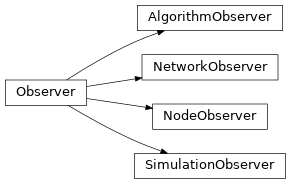
Observer inheritance diagram
The observable classes
Standardize the use of observers in the framework, we implemented a mixin class ObserverManagerMixin that
can be used to add observer functionality to any class. The mixin class provides methods to add and remove observers,
and to notify the observers of changes in the observable object.
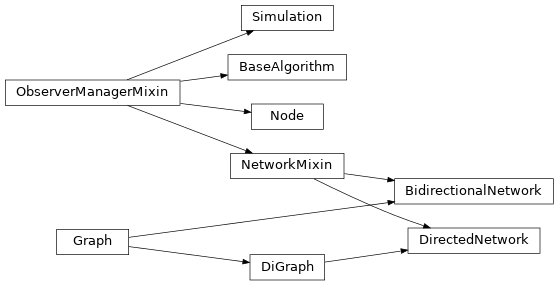
ObserverManagerMixin inheritance diagram
The metric collector
In addition to the observer classes, PyDistSim provides a special observer class called MetricCollector.
The metric collector is used to collect metrics from the simulation, and to store the metrics in a data structure.
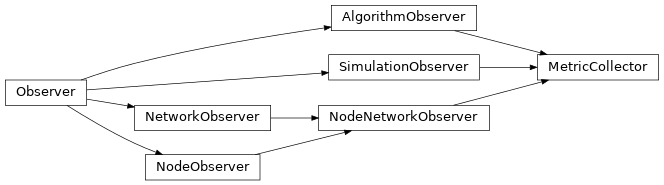
MetricCollector inheritance diagram
To enable the metric collection, the simulation object must be configured with a metric collector object like this:
metrics = MetricCollector()
sim = Simulation(net)
sim.add_observers(metrics)
To access the collected metrics, the MetricCollector.create_report() method can be used.
Subclassing MetricCollector
Extend this class and implement the desired event methods to collect custom metrics.
For registering events, call the MetricCollector._add_metric() method.
Add an instance of your custom collector to the simulation observers for it to work.
Even so, you can use the events attribute to register the new events you want to listen to.
This includes new custom events that you would trigger from a custom algorithm.
Example of implementing a custom metric collector:
class ExampleCustomMetricCollector(MetricCollector):
    events = ["example_custom_event"]

    class CustomMetricEventType(StrEnum):
        "Definition if this enum is optional. It helps to avoid typos in the event names."
        EXAMPLE_CUSTOM_EVENT_ZERO = "EXAMPLE_CUSTOM_EVENT_ZERO"
        ...

    def on_example_custom_event(self, a, b, c):
        self._add_metric(
            self.CustomMetricEventType.EXAMPLE_CUSTOM_EVENT_ZERO,
            {"a": a, "b": b, "c": c}
        )