Installation
This document assumes you are familiar with using command prompt or shell. It should outline the necessary steps to install software needed for using PyDistSim.
Requirements
PyDistSim requires Python 3.11. Every other dependency will be installed automatically by pip.
Note
Since there can be only one version of any package installed system-wide in some cases this can result in situation where two programs need different versions of the same package. This is resolved by using isolated virtual environments.
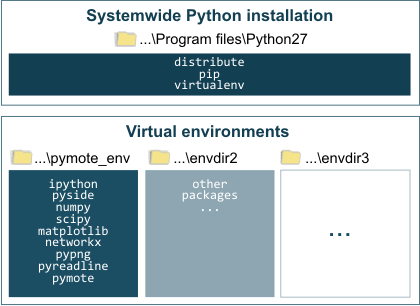
Virtual environments live in a separate directories and they are independent form system-wide Python installation.
Alternatively, if none of the above is your concern, although not recommended, PyDistSim and all required packages can be installed system-wide using their respective instructions for appropriate OS, just jump to the end of this document.
Windows
Windows version should be as simple as installing Python 3.11 for windows.
Linux (Debian/Ubuntu based)
To install Python 3.11, run:
$ sudo apt install python3.11
Depending of the flavour of linux, some packages are required for getting and compiling the source, only install if the above command fails:
$ sudo apt-get install libxkbcommon-x11-0 libegl1 opencv-python-headless libgl1-mesa-glx
Virtualenv
pip and virtualenv (venv) are included in Python 3.11. To create a new virtual environment run:
$ python3.11 -m venv pydistsim_env
Activate virtual environment on Linux:
$ source pydistsim_env/bin/activate
Activate virtual environment on Windows:
$ pydistsim_env\Scripts\activate
PyDistSim
Finally, in order to download and install PyDistSim and all other required packages, run:
(pydistsim_env) $ pip install PyDistSim